Shapes
SHACL shapes drive the user interface. They supply the fields of Properties, the predicates of the relation pickers, the tools of the palette, and the validation.
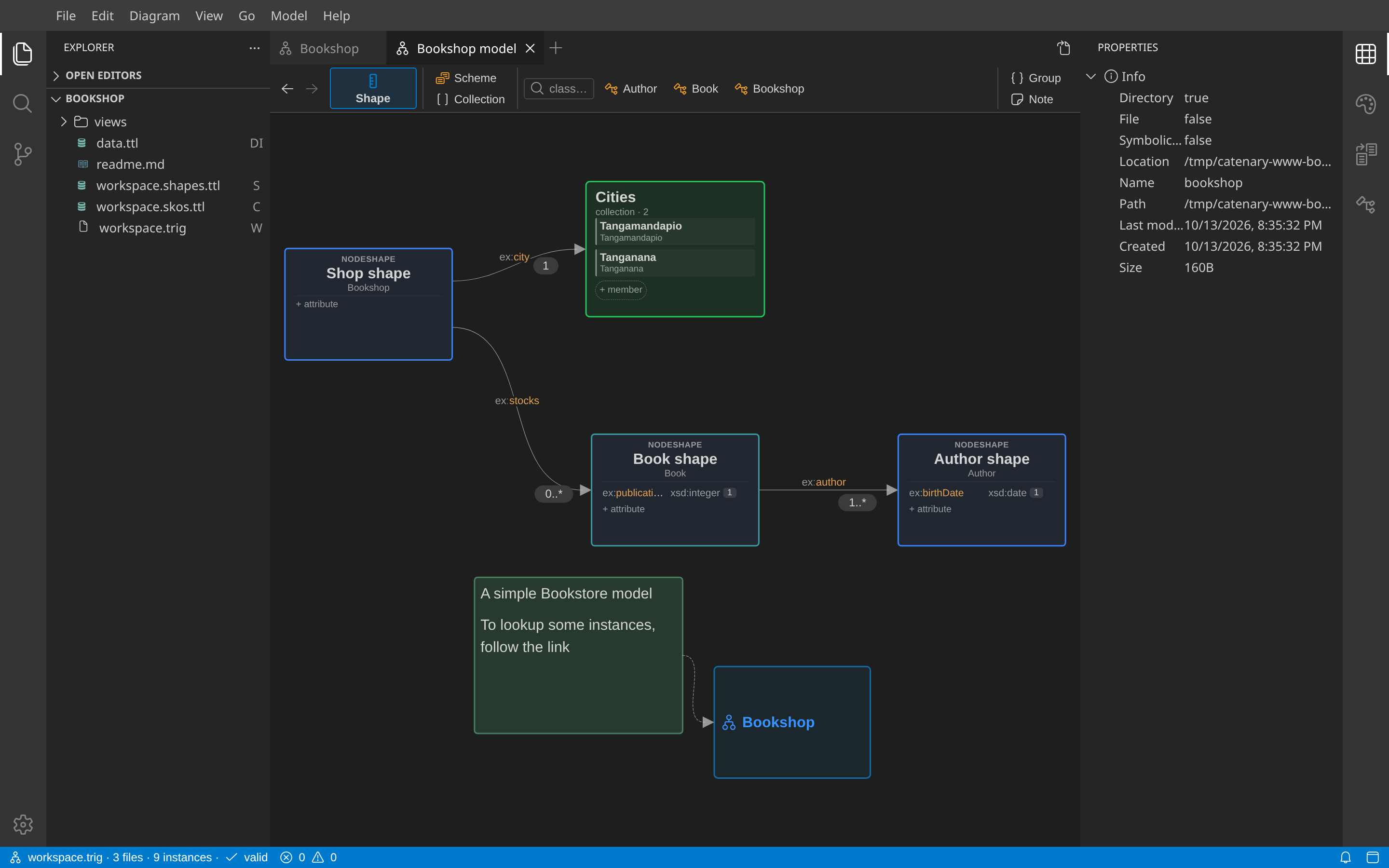
Node shapes
- A node shape card shows its target class under the name, and its properties as rows or lines.
- A new node shape opens its name for edit. The typed name also sets the target class: the known class with that name, else a new class IRI from the name. Escape keeps the default name and sets no class.
- Shape cards show their targets. Dashed arrows show predicate targeting and node constraints. These arrows do not change the data.
- Enter shape IRIs in Node constraints. These shapes check the same focus node. A property-level node constraint checks property values.
- The applicable-shape control shows unplaced shapes for an instance. The checked-instance control shows unplaced instances for a shape.
Property shapes
- A property with a datatype, a node kind or no range is a row of the card. + attribute adds an
xsd:stringproperty with cardinality 0..1. - A property to a node shape, a value set, an "in" box or a class pill is a line to that box. When a card arrives on the view, the lines between it and the shown boxes are placed.
- Click the cardinality badge to cycle 0..* → 0..1 → 1 → 1..*.
- Double-click a path or line label to edit the path. Double-click a pill to edit the target.
- ⇥ on a row shows the line; the return arrow on the line shows the row again.
- A change of a path or a target class can propose a data migration. Apply it with Apply to data, or dismiss it.
Logical constraints
- A logical constraint (
sh:or,sh:xone,sh:and) without a hub on the view is a row group: the operator, then its members. ⇥ on the operator row shows the hub and its member lines. - Drag the logic handle of a property onto another property of the same shape to make an Or constraint.
- A property under
sh:notis a row with the tag «not».
Value sets
A SKOS scheme or collection can be the range of a property. + concept and + member add concepts. Drag a concept onto another to add a broader parent.
Shapes from data
Propose Node Shapes from Data (on a class or instance) and Model → Propose Missing Shapes create shapes from the existing data. The result opens in a new view "proposed shapes". Review it: it describes the data, it is not a rule.
Validation
Catenary validates after each change, in the mode of the workspace settings (Off, Open views, All). A violation shows as a dashed border and a badge on the card, as a cross next to the field in Properties, and as a row in Problems.