1. A new workspace
This tutorial builds a small bookshop model from an empty folder: a scheme of cities imported from outside, two shapes, a few books and an author, a document with a diagram, and its export. Each step shows the state of the screen after the step.
Create the workspace
- Start Catenary.
- Select File → New Workspace….
- Select an empty folder and accept the proposed file name
workspace.catenary.trig.
Catenary creates the workspace file, one file for shapes, one file for SKOS, and the view views/main.view.trig. The view opens as an empty canvas named Main.
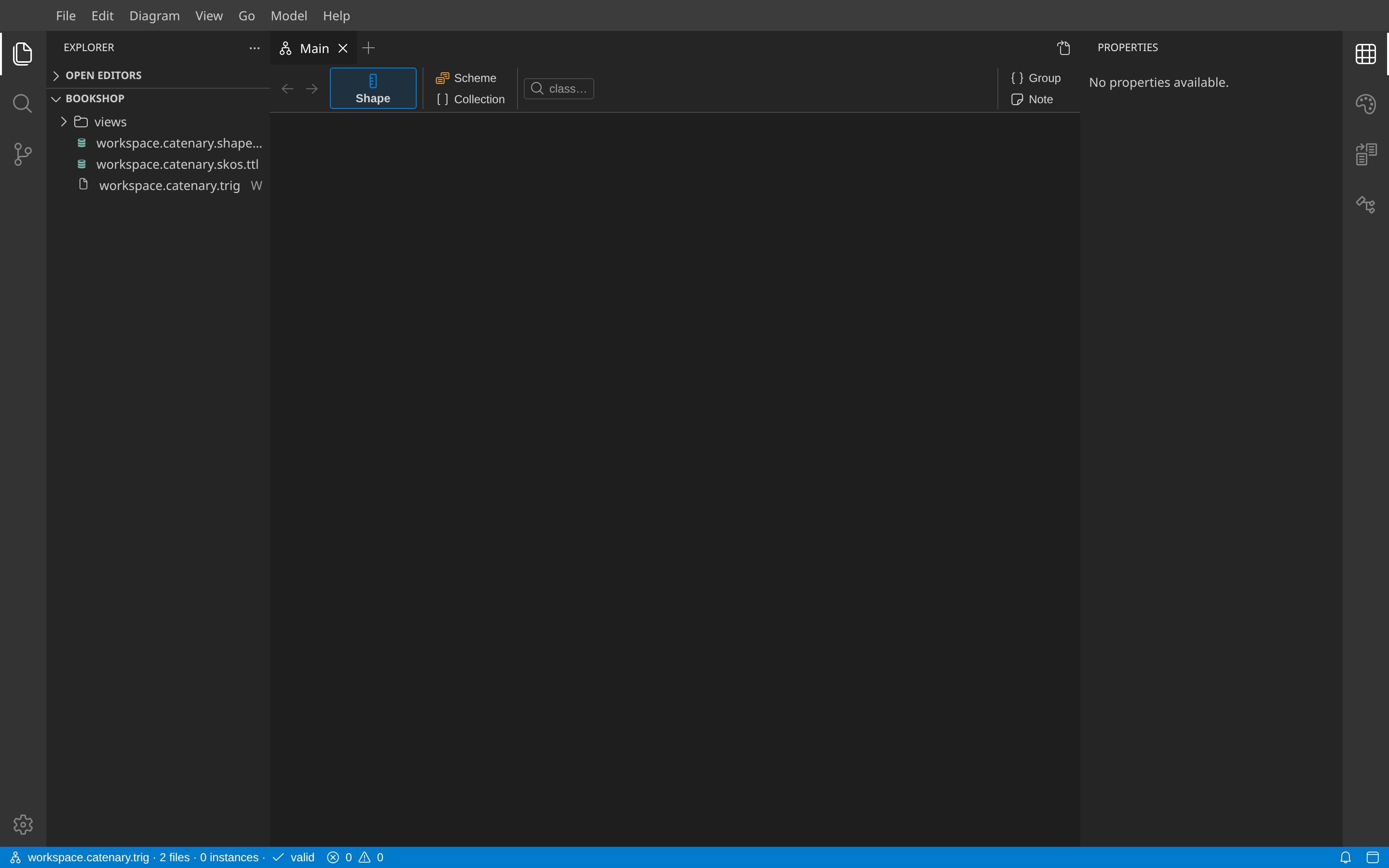
What you see
| Area | Content |
|---|---|
| Explorer (left) | The files of the workspace. A letter after a file says what it holds: S shapes, C concepts, I instances, V views, W workspace settings. |
| Canvas (center) | The Main view. The palette above it creates elements. It shows one tool per class once a shape exists. |
| Properties (right) | The fields of the selected element. Nothing is selected yet. |
The workspace file holds the settings: where new subjects go, the prefixes, and the locked files. You can open it at any time to change them.
Next: Import a file.